Files are going away. Here's how to manage invisible documents
In this post, we'll investigate how modern apps are moving away from the notion of a 'file', and how this makes our job more difficult.
The solution is simple: use your JDex to tell yourself where things are. This trick works just as well if you want to save links to documents stored on a website, in SharePoint, or anywhere else.

This post has an accompanying video. Become a Pro member to view it.
MindNode modernises
One of my most beloved apps, MindNode, has rebuilt their app from scratch. What was MindNode is now MindNode Classic, and while they say it's still maintained, evidence suggests otherwise.
That's fine. Software marches on, so let's download the new MindNode and move with the times. Okay, done that. Now let's go to File > Open… and open the mindmap I was working on yesterday.
Sad trombone sound
That is … not what I was expecting. I was expecting this.
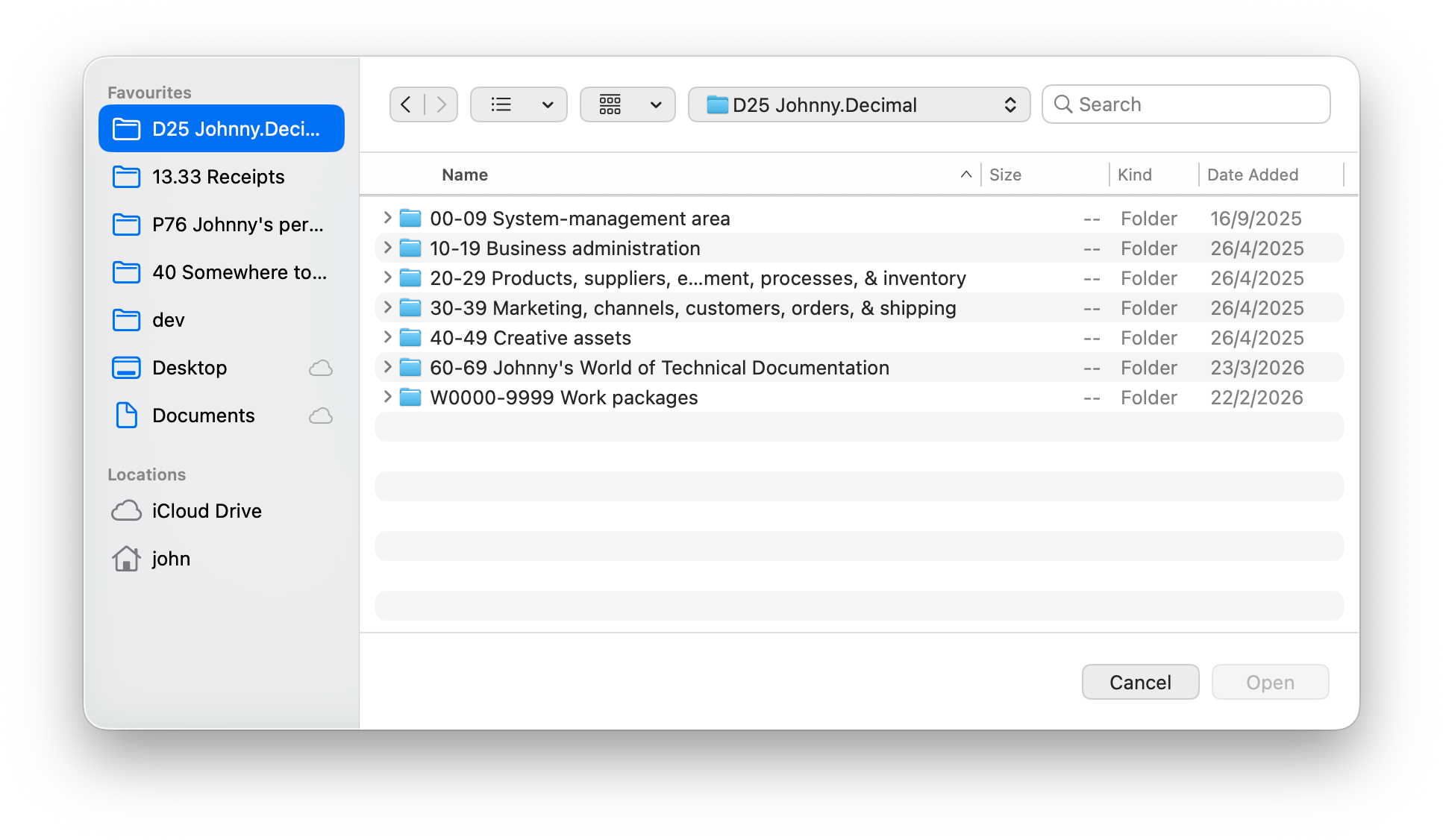
There is no file
This will be familiar to those of you who use online tools like Google Workspace, Canva, and one of my favourites, tldraw. There, you have no notion of 'a file' that can be saved. Where would that file even be?
This abstraction is at the root of an issue made famous by the 2021 Verge article 'File not found: A generation that grew up with Google is forcing professors to rethink their lesson plans'. How would you know how filesystems worked if you'd never used one?
In this model, your files are managed entirely by the app that owns them. MindNode is using an Apple CloudKit database to store my 'files'. I put that in quotes because it really is incorrect to call them 'files' any more. They're now 'documents' in a database.
To what end?
There is a good reason for this: sharing.
How would Joe Lunchbox go about using this file on his iPad? Or sharing it with a colleague? I don't mean emailing a copy, I mean real-time collaboration. Did I mention that his colleague uses MindNode on his Apple Vision Pro?1 That's difficult if you don't know what you're doing. But it's enabled for free by CloudKit.
Not only is it free as in money, it's very simple for a developer to set up. They get the storage, security, and sharing provided by Apple as part of the CloudKit service. I know this because I'm using it myself for the app I'm building. It's a really great feature.
One more place a thing can be
Okay so what? Files don't exist, they're stored in a database. What's my Gen X problem?
My problem is that this is yet another place that a thing can be.
When I sit down to work on this mindmap – where I'm trying to clarify the extend-the-end pattern for Felicks on Discord, and for myself so I can explain the idea more clearly – I need to reconfigure both my computer and my mind. I need to recall my notes, figure out what I was going to do next, and of course I need to open up the mindmap.
The list of places I need to recall for this trivial task is now:
- My JDex note (Obsidian).
- The Discord thread (a URL).
- The location of this mindmap.
That's not a long list, but it's this silent friction that makes our computers hard to use: every time you context switch to a new task you need to figure out where this stuff is. And of course the list of possible places is different for each thing that you do.
Undiscoverable
'The location of this mindmap' has now become very un-discoverable. I can't go pecking about my filesystem for it. In writing this post I created a test file with a unique name and used the command-line mdfind, which hooks into the system Spotlight database, to find it. No results.
I asked Claude – an absurdly efficient finding machine – to tell me where it was. It spun its wheels with find commands for 3 full minutes until I interrupted it. That was when we realised that the document is buried in a SQL database, invisible even to the all-knowing LLM.
Forgettable
Discoverability is one side of the discoverability/rememberability coin. (I probably won't take that analogy much further.)
Let's say I come back to this thing in a month. I can't even assume that I'll remember that I created this mindmap. In a world where all your stuff is in one folder and to 'do work' you open that folder and rummage around, this isn't a problem.
But in a world where my stuff is in databases stored in CloudKit, I need to remind myself that it even exists before I know to go looking for it.
The solution
The solution of course is your Johnny.Decimal index, or JDex. You need a place that you control, and this is it.
As a reminder, the typical structure of a JDex entry is this.
# 11.11 Title of entry

- Locations:
  <list of places where this exists>
- Related to:
  <links to related items>

---

This is where the text of the note goes,
so on and so forth, blah blah.
The 'frontmatter' above the --- line varies depending on the information you need to store. If you use Obsidian you might use YAML properties. I just use a bulleted list.
And so in this list of locations, just tell yourself that there's something in MindNode. I find the gentle pointer to be enough: you don't need to be explicit. Just guide yourself to the place.
- Locations:
- MindNodeThat's it. Keep it simple and you'll be more likely to do it – because you still need to remember, in the moment, to create this breadcrumb.
Use the 'deep link' if you have one
A 'deep link' is one that opens a document directly, rather than just the app or site. They're typically very long, with a bunch of random characters at the end. Here's one to a Google Drive document.
https://docs.google.com/document/d/1N5ZnznL3LkHmt-vm4z7jF1YKGqzbbhmkPs3J0aiiC5k
MindNode will generate a deep link at File > Copy Link to Document.
So now you can use this link in your JDex entry, and clicking it will open the document directly.
- Locations:
  - [MindNode](https://mindnode.com/document/4CZ02g…)
Formalising 'Locations'
I'm going to make this simpler and more useful by recommending you assign standard zero category 01 Locations to your system.
You'd then define an ID for each location, and use links. For example if you define 01.11 MindNode and link to it from any note like this…
# 11.11 Your ID

- Locations:
  - [[01.11 MindNode]]
…then you'll get a list of backlinks from the MindNode note that tells you what you've stored there.
Not having given this deep thought yet, I'd probably suggest creating broad IDs for classes of locations, then extending for specific locations. Because you only get 90 locations.
01 Locations
   01.11 Apps & websites
         + Canva
         + MindNode
– then your link would look like
- Locations:
  - [[01.11 Apps & websites+ MindNode]]
More on this in a follow-up post soon.
Footnotes
-
Of course nobody uses MindNode on their Apple Vision Pro (you can – they built it), but they do use it on their iPad. The principle and technology are identical. ↩