The Life Admin System
The Life Admin System
Nobody taught us how to do 'life admin'. We make it up as we go, spreading our mess across cloud drives, download folders, and email.
Did you file that new policy document in House/Insurance or Documents/Important? Or just give up and leave it in your inbox? How will you find it when a water pipe bursts?
This underlying stress affects us every day – speaking to companies, booking things, sorting issues, or dealing with the kids' school. This stress makes using computers a chore.
It doesn't need to be like this.
The Life Admin System is a ready-made Johnny.Decimal structure that contains the common stuff we all do. I use it to organise my own life.
There's an ID for everything. No decisions, no ambiguity. Your home
insurance policy document lives at 12.12 Home insurance & claims.
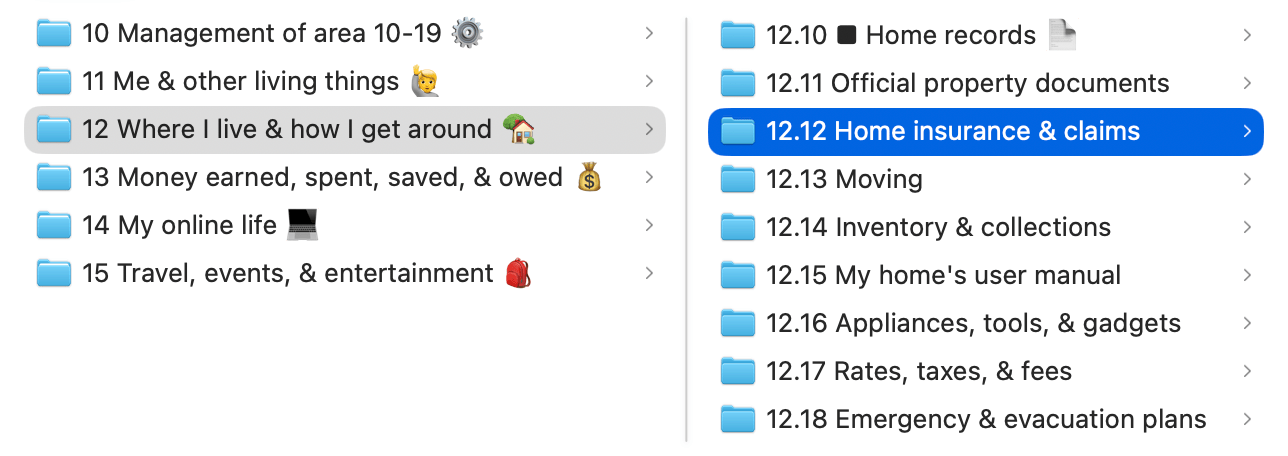
Use the same system in your reminders and anywhere else in your life. Create folders in your email and filing cabinet. Say it out loud when your partner asks where it is.
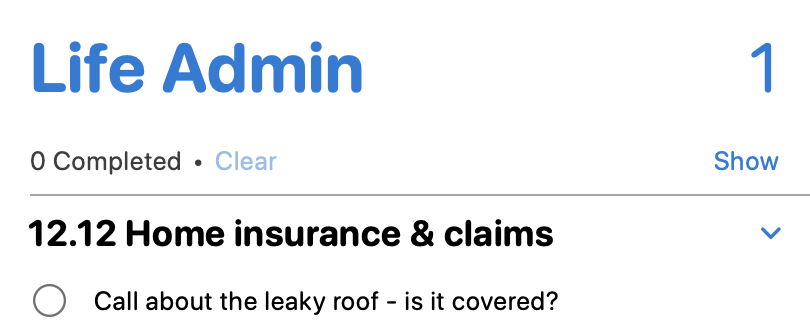
12.12 is now a stable reference to home insurance across your entire
life. This can dramatically reduce the anxiety felt when using a computer. You
know where everything is, and if you forget just search your index. This is
a really nice feeling.
“One day using this pack … everything has a home, and I finally feel in control again. Thank you!”
— Chris
2,000+ people run their lives on this system. It's simple and it works. This is how your computer should have been designed from the start.
Download it and move in. You'll be more organised by the end of the day.
Pay with PayPal.
No subscription. Updates for life.
Everything has a 14-day money-back guarantee.
What you get
The system aims to cover 90% of the stuff that 90% of us do.
It fits in a single area, 10-19 Life admin. With
140+ meticulously designed IDs across 5 categories giving you
a place for everything.
As well as a searchable index with 10,000 words of description and examples listing every ID, what might go in it, and any exceptions.
We took care to make the structure consistent. There are familiar patterns to help your brain know where things will be. Everything is documented, and links point you to other IDs where relevant.
Membership tiers
Life Admin is included in all membership tiers. Start with Personal or level up to Pro for our full suite of training and software.
| US$35 | US$210 | US$360 | |
|---|---|---|---|
| Life Admin 140+ IDs for your life | Included | Included | Included |
| Software AI tools for your agent | Not included | Included | Included |
| University 10+ hours of video training | Not included | Included | Included |
| Small Business 150+ IDs for your business | Not included | Not included | Included |
AI requires your own agent (ChatGPT, Claude). Works with local models.
People like it
“Before I was the subfolder after subfolder guy and had no idea in which folder I had stuff stored … the index was a really great thing – for me it removes all my stress for trying to hold the knowledge of was this in onedrive or icloud or google drive or email or trello?”
“It already transforms how I feel about my files, how much fun I have categorising them, and the calm I feel when I need something. Thank you from the bottom of my ADHD heart.”
What it isn't
People are sometimes disappointed that this system doesn't have a place for literally everything in their life.
But think what that would mean. An exhaustive categorisation of everything that any human might plausibly do? That's going to be huge, and have lots of stuff most of us won't need.
Once we stray from the commonality of life admin, you need to design your
own categories. This is why it's a single area,
10-19 Life admin, leaving
20-29 through 90-99 for your stuff.
- Maybe you're a
20-29 Marriage celebrant. - You might have a popular
30-39 Science podcast. -
Or you could be the local
40-49 Tennis clubpresident.
Whatever it is, it's unique to you. We can't design it, but we can help you. Use Life Admin's ideal patterns as a guide. Take our 5-hour video workshop (requires Pro) and build the rest of your system with Lucy.
If you're ever stuck, just ask. We have open community forums, and you can always send me an email. I answer every one personally.
Questions
What software do I need?
The system works with whatever you already use. You'll need an app to manage your index. I recommend Obsidian but you can use any app that either lets you keep a list of notes, or is a database. People use and enjoy Bear, NotePlan, DEVONThink, Notion, Craft, Emacs, and more.
It works the same on Mac, Windows, or Linux. You can even use it on your iPad, though setup is a little harder because of its limitations.
Where is my data stored?
Wherever it is today: I never touch your data. What I give you is structure and process. If your data is on your iCloud Drive today, that's where it stays.
What happens after I buy?
If you're not signed in, you'll receive an email after your payment is processed. It has a link to create your account. If you're already signed in, you'll get instant access to your purchase.
What's the guarantee?
If you don't like it, you can have your money back. No questions asked. You've got 14 days to check it out. Forward your purchase receipt to hello@johnnydecimal.com.
If you want to tell us what we could have done better, please do: it really helps. But no pressure. You can just say 'I'd like a refund'. If you can't find your receipt, tell me what you purchased and when and I'll look it up. (You should be more organised. Ha ha.)
Can I upgrade later?
You can upgrade from any membership level to a higher level at any time. Anything you've already paid will be discounted from the upgrade amount.
Is there a coupon/deal/offer?
No. You'll notice that we don't try to trick you with fake countdowns or bogus 'deals'. When you buy something there isn't another screen that tries to upsell you at the last minute. The price is the price.
Similarly, we don't do seasonal offers. So you don't have to think about when to buy, or wonder if waiting will get you a deal.
What if I need help?
Email me. I answer every message personally, usually within 24 hours.
Buy
Pay with PayPal.
No subscription. Updates for life.
Everything has a 14-day money-back guarantee.