A simple photo management technique
This week's video addresses one of the all-time popular questions: how do I manage my photo library?
You might think that I'd recommend using Johnny.Decimal IDs. But no: my IDs are good at providing structure where none already exists. And of course they enforce a strict hierarchy: IDs in categories in areas.
Photos already have a natural organising structure: the date and place they were taken. We can group them into 'events', which is how your brain thinks about them. And rather than a strict hierarchy, they respond better to questions like 'whose face appears in it?' or 'is it one of my favourites?'
This is why I recommend you use a photo management app. It's the right tool for the job. So in this week's post, I'll show you a simple photo management strategy that takes no mental energy, and leaves you with a library you'll love again. The accompanying video is for our Personal members.

Now's a nice time to give your library a bit of a clean-out, before it fills up over the holidays.
AI corner
Big news: you can now add the Johnny.Decimal MCP server to Claude by just browsing the directory. This is a lot easier than adding it manually.
The MCP server is a way for your agent to talk to my server. I build 'tools' that it can use, and I give it access to all of my system data. So for example it can query the full 50,000 words of the Small Business System manual, or the summarised views that I've generated from 5+ years of my forum posts.
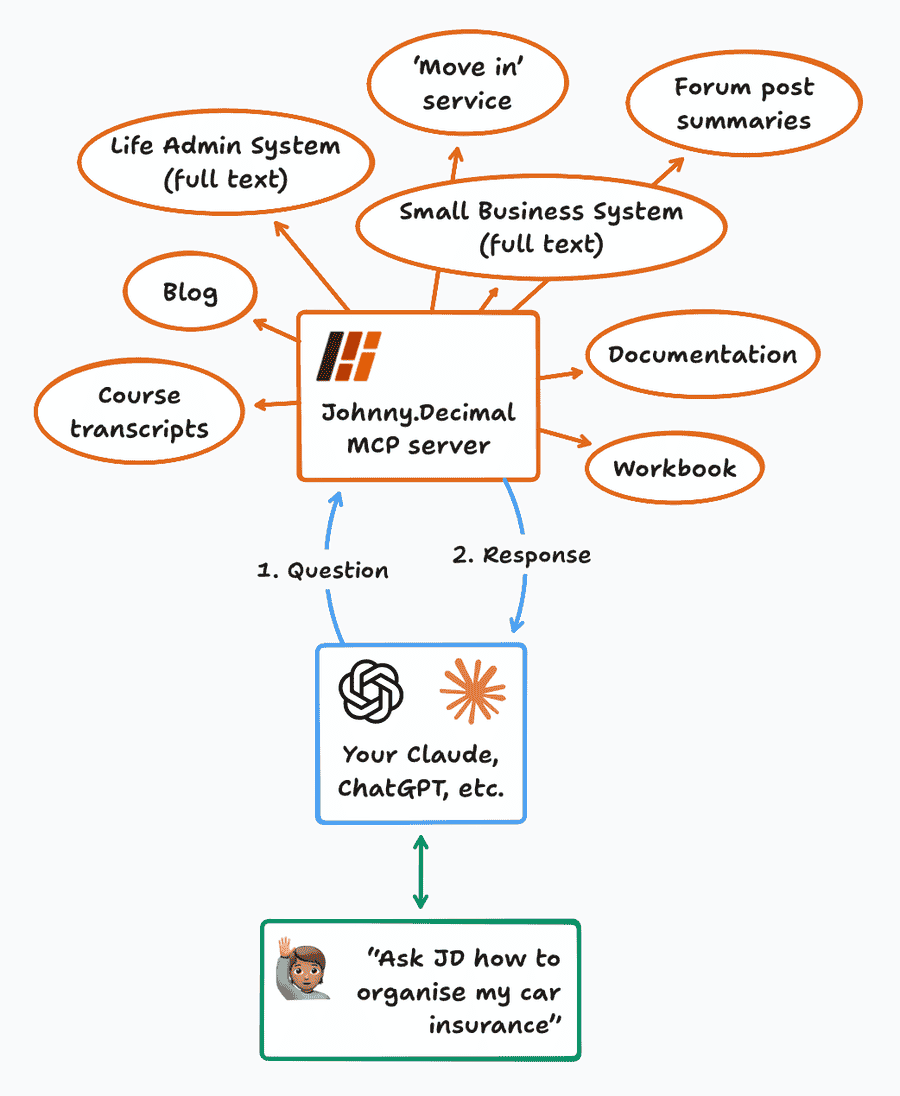
You do this by connecting it then saying “ask JD to…” and then whatever it is you want to do. Easy as that. Your AI can read the files you give it access to, but it never sends any of your information to my server.
'Move in' upgraded
I've completely re-written the 'move in' tool. This takes your existing unorganised mess from wherever it is and files it into either the Life Admin or Small Business systems.
The process is now much more methodical. It no longer requires installation of the command-line utility, so if you use the Claude or ChatGPT desktop apps it now works. Every step presents you with simple, multiple-choice responses, always with a recommendation.
Try it out: just say “ask JD to help me move in” and follow the prompts. Let me know how it works, and if you have any issues at all.
The MCP server is a work in progress – tell me what you need it to do. (All MCP tools require a Pro account.)
ChatGPT, Gemini
The ChatGPT connector should follow this week: I've submitted it, and it's in review. Until then you can still manually connect https://johnnydecimal.com/mcp to any tool that supports it.
And if you'd previously tried to connect Google Gemini and it failed, try again. Thanks to Decimal Aaron for the bug report on that one.
We had our flu and COVID shots at a clinic here in Japan this morning, thanks to the miracle of voice translation. It just wouldn't have been possible 20 years ago.
And yet the same clinic that has handheld translation devices only takes cash! It's the year 2027 in a couple of weeks! Japan is definitely its own country. You know the fax is still in daily use here?…
See you next week.