Let's talk about email
Hi everyone. This week marks the start of an ongoing series, and it's one we've been meaning to get to for a while. It's everyone's favourite topic: email! 😛
When was the last time you got a good email? When I 'went travelling' back in 2003 we used to spend the afternoon in internet cafes writing these big long emails to the people back at home. A) as if they cared what I was doing in Thailand, and B) imagine that now! Getting an email from a friend with details of their life. I can count the number of those that I've received this year and … let me check … yep, zero.
Instead, last week I got 149 notifications, tasks, newsletters, resets, and warnings. Chores, for the most part. (I do still get emails I treasure, genuinely – and they're from you, my customers.)
So how do we deal with this? How do we save stuff so we can find it? How do we not forget to respond to the good stuff? And how do we manage email's absolutely critical role as the de facto centre of our digital identity?
It's this latter question that we'll focus on first, because I think it's the most important. There's a good chance you're going to have your identity and/or money stolen online, and it's a dead cert that email will be the reason. So we'll start by showing you what I think is 'basic email hygiene' for 2026.
A nice side-effect of securing your email is that it puts you totally in control. I didn't mention spam above, because I don't get spam. No spam. No hacks, no phishing attempts, nothing. I'll show you how that works; how as a small business you can become more professional by doing away with that @gmail.com address; and how I recommend you process incoming email so that it takes essentially no time.
In short, I'll show you over the next couple of months everything I know about email. This week's introductory video is open to all. The rest of the series will be for our Pro members.
We'll be breaking it up with videos that aren't about email – next week, I'll show you the simple photo management technique that I use. I've gone from thousands of photos I never looked at, to a handful that I treasure, without making any hard decisions.
Updates and improvements
A handful of tweaks to the site this week.
- Apple, who really seem to care not one tiny bit about the import feature in Notes, broke the import feature in Notes. 😩
- So I built an import utility that now comes with the JDex downloads for our Life Admin and Small Business systems.
- Outliners are a class of app that work well with Johnny.Decimal. In essence, they're an indented bullet list, but with more features. Simple but powerful: a great combination.
- We publish updates to the Life Admin and Small Business systems at Support > Updates.
- These updates are now system-generated. So they'll be more accurate.
- The jd command-line utility now has a
jd upgrade --dry-runcommand. - It analyses your installed system compared to the current system and tells you what to change to bring them into alignment.
- A future version will perform the upgrade for you.
AI corner
Claude saved me $450 by spotting an accounting mistake. And now it helps me classify my international transactions to ensure I report correctly to the Australian Tax Office. This saves me hours at quarterly tax time. It can do this because I've connected it to Stripe and Xero.
I've given an AI access to my payment platform and my accounting software?! Have I lost my mind? I have not: because I've set this up to be secure, and foolproof. I'll explain very briefly here, but my question to those of you running a small business is would you like me to make a series explaining how to do this? If so, let me know.
You might imagine that I've given Claude my passwords and told it to log in as me.
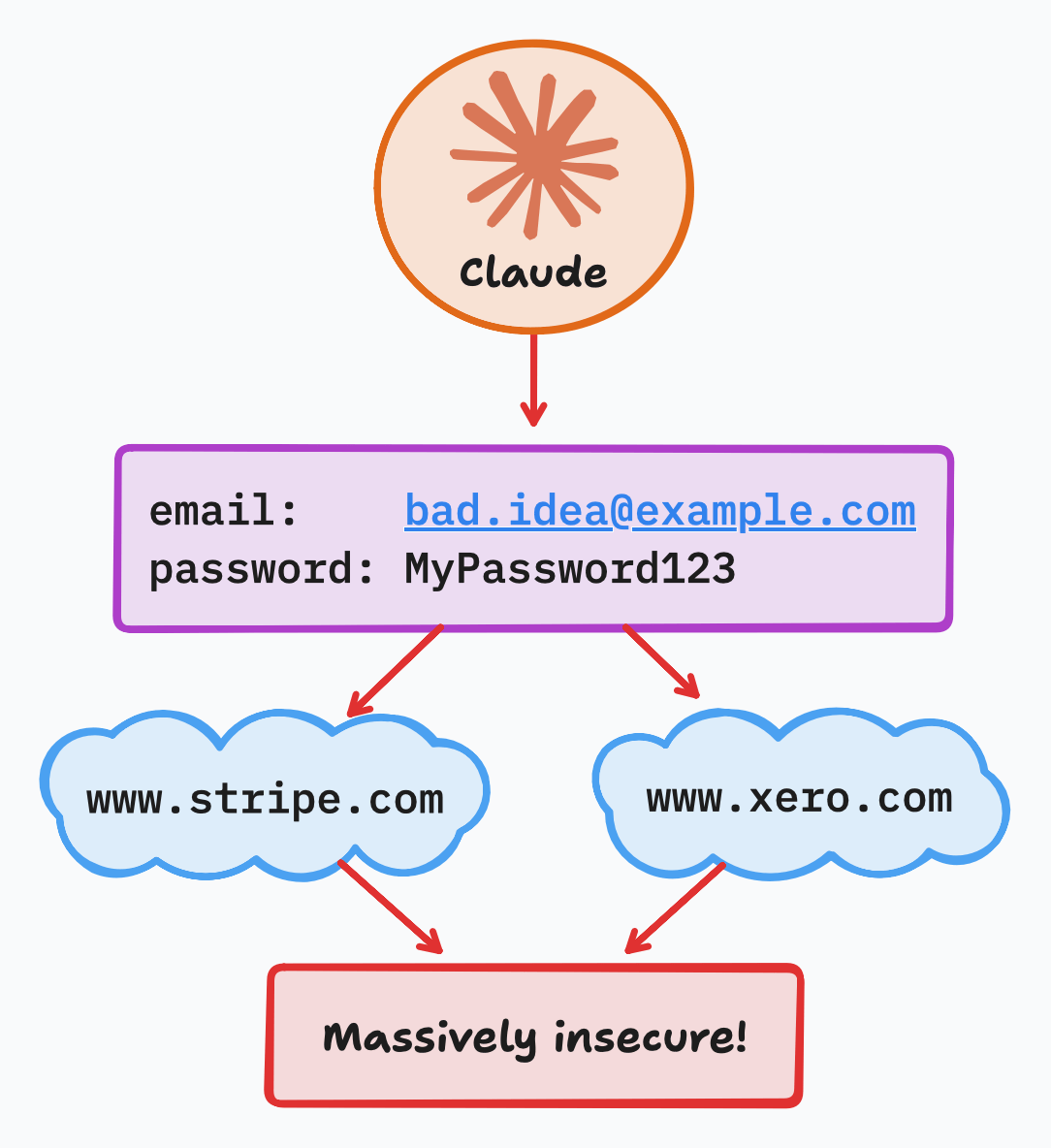
Technically this would work, although Claude's built-in classifiers would likely refuse the request. But you might use an open model that doesn't have the same guardrails. And obviously it's a terrible idea!
What we need is a different approach entirely. Fortunately, this has existed for decades. It's how the internet already works – you just have to know how to do it.
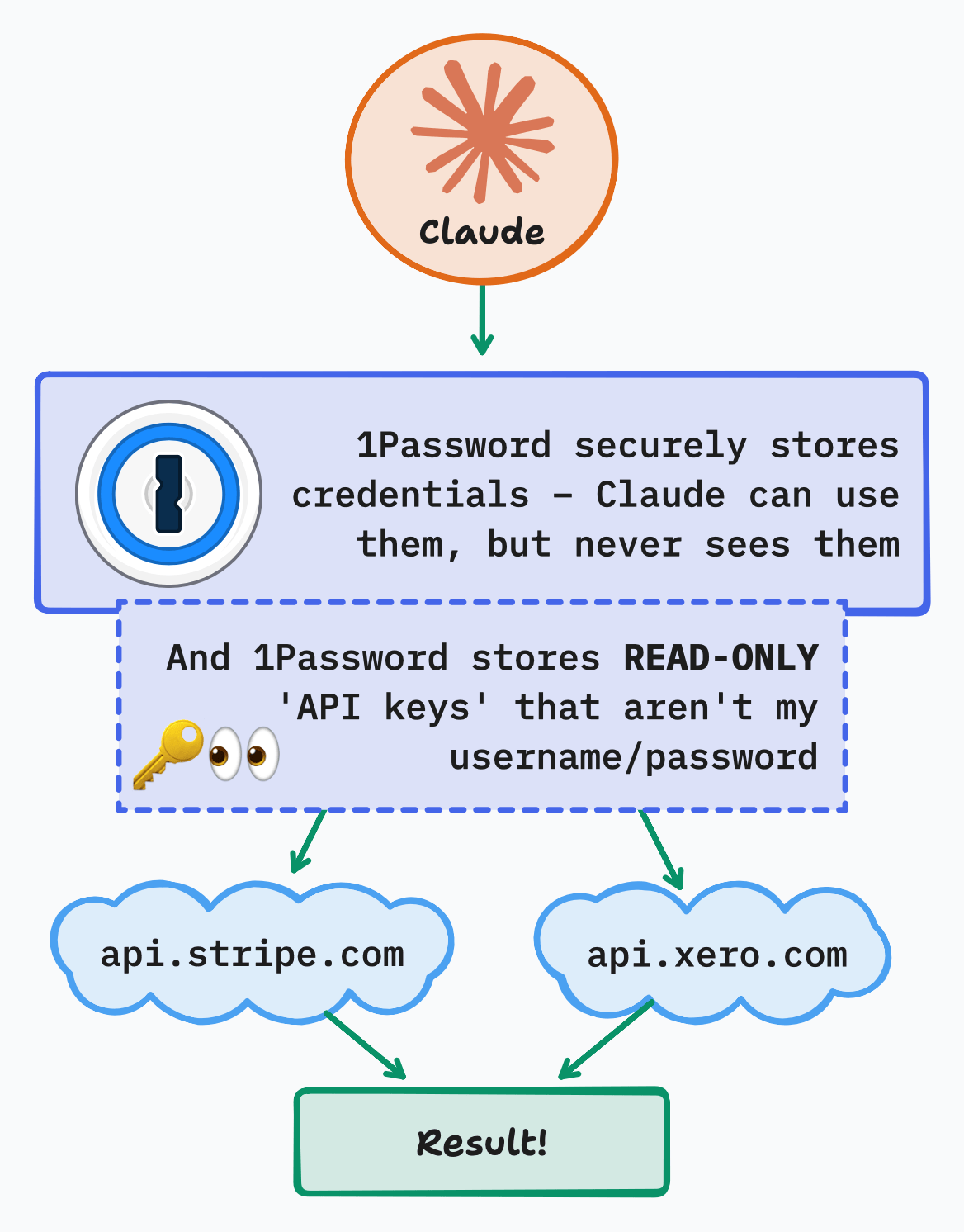
The two key parts are:
- A good password manager. I recommend 1Password. It has features that make this setup very easy and secure.
- Using 'API keys' instead of your own login. Crucially, you can configure these keys to be 'read-only', which is exactly what it sounds like. So now Claude can't even accidentally steal all of your money: it just isn't possible.
What's amazing about all of this is that Claude will help you set it up. You just need to know what to ask for. So if that's interesting, let me know. I use this same technique to give Claude access to my email and a bunch of other services.
It's snowing now. Thanks to Decimal Eric for letting us know that ducks are adapted for the cold. See you next week!