Standard 'life admin' pack
We've been spending the last few weeks developing a standard 'life admin' pack. The idea is that it'll handle 95% of what 95% of people need to run their daily lives.
It's been an interesting process. We did it by the book, starting by 'discovering' all of the things that people tell us they need to organise on the forum, email, workshop comments, and looking back at our own lives.
Then to design a structure we cracked open MindNode and we spent a few days just talking it all over. Looking at every decision, questioning it, refining it, moving things around.
And then I moved my entire personal life in to it, which caused us to refine it even further. So I'm proof that this works.
Who's it for?
At JDHQ we've been calling this the 'JD quick-start' pack. We've designed it for everyone: the idea is that you don't need deep background – any background, really – in Johnny.Decimal to jump in and use it.
And you shouldn't have to spend a week 'getting organised' to, well, be organised. Everyone needs this stuff.
We've spent a hundred hours figuring it out so that you don't have to.
One area, five categories
I knew I wanted this to be a single area.
The more I do this the more I'm convinced that broader – much broader – categories and IDs are the way to go. And that my advice from a decade ago to 'not create subfolders' is no longer relevant: see below for the secret to subfolders.
(I think it was good advice at the time. But the landscape has changed; the amount of stuff we all store has grown. That changes how you should think about storing it.)
And we've compressed everything in to just five categories.
Dates solve so many problems
You can compress an amazing amount in to a single ID when the first thing you see inside that ID is a list of dates, formatted yyyy-mm-dd so that they sort nicely.1
For instance, we've designed a single ID:
10-19 Life admin
 15 Travel, events, & entertainment ✈️
    15.41 All short trips
We realised that a 'short trip' – one that you don't really need to plan, you just book and go – doesn't need its own ID. We all make these trips all the time.
So a single ID is enough, as long as its subfolders look like this:
10-19 Life admin
 15 Travel, events, & entertainment ✈️
    15.41 All short trips
2024-02-04 Melbourne
2024-04-18 Sydney
2024-05-28 Brisbane
2024-07-13 Adelaide
And in each of those, for a short trip you might just have a flight confirmation and a hotel booking. Simple.
Subheaders
An idea I've toyed with over the years, and one that I usually avoid because of its unpredictability.
But in this highly-designed system, it's really useful: subheaders.
10-19 Life admin
 13 Money earned, saved, owed, & spent 💰
    13.10 ■ Earned 🤑
    13.11 Payslips, invoices, & remittance
    13.12 Expenses & claims
    13.13 Government services
    13.14 Gifts, prizes, inheritance, & windfalls
    13.15 Selling my stuff
    13.20 ■ Saved 📈
    13.21 Budgets & planning
    13.22 Bank accounts
    13.23 Investments & assets
    13.24 Pension
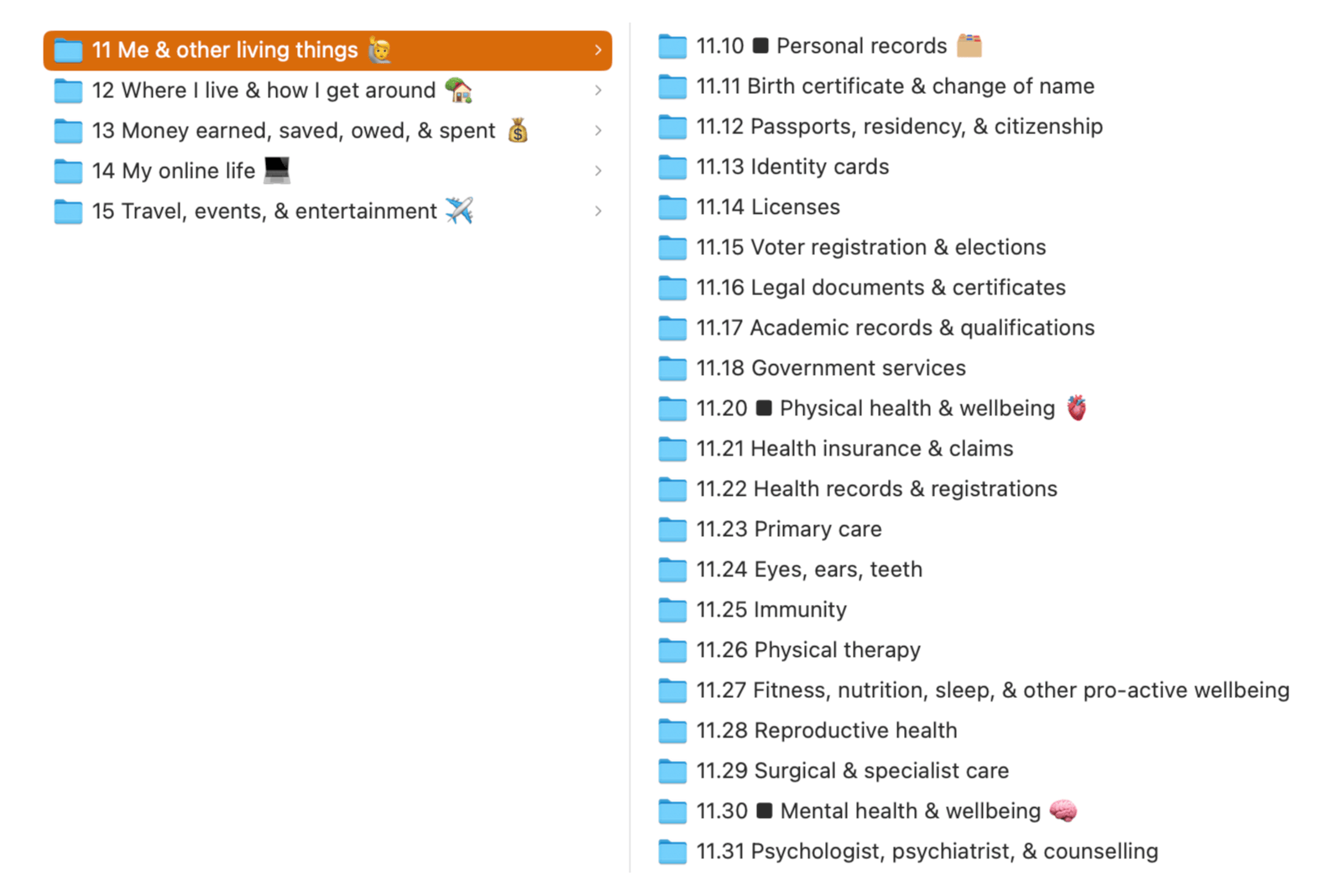
We picked the 'black square' symbol because it looks nice in macOS' Finder.
This works really well in breaking up a long list of IDs.
The emoji really help 😛
We've sprinkled emoji throughout, and they're really useful. They give your brain something else to anchor on to.
(When we release the pack there'll be a version without emoji if you're the sort of person who takes yourself really seriously.)
The pack
The pack will contain this folder structure as a download, and links to shared folders on all of the usual cloud platforms.
It will contain an index, either as downloadable text files that you can import in to your notes app of choice, or as a shared Apple Notes link.
And there'll be a version that you can import in to Bear, which uses its unique nested-tag feature to build a really nice sidebar.
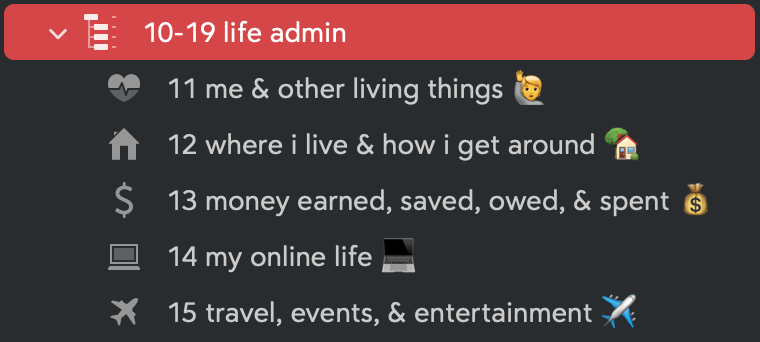
It'll include a PDF manual which details every ID, explains the sorts of things that should (and shouldn't) go there, and points out any obvious exceptions.
Eventually – not in the first release – we're going to have a short series of videos which explain the structure and our thinking in more detail.
Money
Its full list price will be US$20. It'll go on sale for US$10 as it won't be 100% finished. Obviously if you get it early you'll get all updates.
If you're reading this, you can get on pre-sale now for just US$8. it's launched: see 14.11 for the current deal.
Sneak peek
This looks really great in your file system. Honestly, I love it.
Feedback?
I'd love to know what you think of this. Is this the thing you want more of? If not this, what?
We sit here and try to work out what people want. It's much simpler if you just tell us! :-)
Drop me an email and let me know.
Footnotes
-
And I recommend the dash as a separator, vs.
yyyymmdd, as it really improves readability. I also use the fullyyyy, otherwise24-01-23is confusing. The extra characters are worth it in both instances. ↩